In this guide, I’ll show you how to design, create, and produce both physical and digital prototypes of your own card or educational game. It can be a party game, a vocabulary game, an educational game, or even a set of flashcards for studying. The entire SalutCard team follows the process described below, so this guide is based entirely on our own experience. Of course, it may not be perfect for everyone, so feel free to contact us at [email protected] to share your ideas or suggestions. Who knows—maybe one day we’ll even publish a book about card game prototyping. So let’s begin—or c’est parti (French for “let’s go”).
Creating your own game takes time, so choose a theme that genuinely interests you. If it’s your first game, don’t overcomplicate it. Reuse mechanics from existing games, avoid creating multiple decks, and don’t add extra components like tokens, miniatures, or boards unless they’re truly necessary. Your first game should be as simple as possible so you can actually finish it and experience the entire game creation process.
Also remember that card game design is an iterative process: create a basic version, test it, collect feedback, improve it, gather more feedback, improve it again, and repeat. You’ll probably change many aspects of your game during development. This guide is based on that approach—you’ll most likely redesign parts of your game several times.
The game idea
The first step is to come up with an idea and write down a basic set of rules. If you plan to produce the game commercially, think about manufacturing before moving on. For example, games that only use paper cards are relatively easy to produce. However, adding wooden or plastic pieces, tokens, or other components will complicate manufacturing, increase costs, and reduce the number of manufacturers willing to produce small print runs, such as 100 copies or fewer.
At this stage, all you need is a notebook and pen or any text editor, such as Notion, to collect your ideas and describe the basic gameplay and rules. Ideally, you should collect ideas over time rather than trying to invent everything at once. You should also decide what card types and other game elements you’ll need. Don’t write the full rulebook yet, and don’t create the complete list of cards and values at this point.
Card design ideas
Starting from a blank page can be difficult, so use SalutCard templates or look for inspiration on Pinterest (for example, check out our collection of game cards, tokens, and boards). Don’t create the final design at this stage because it will almost certainly change after your first playtests.
Also keep a few things in mind while designing your cards:
- Think about card dimensions. Smaller cards are usually cheaper to produce and easier for players to carry while traveling. Games like Hygge and Bandido are great examples of compact card games. Smaller cards also reduce shipping and storage costs. On the other hand, check whether the printing service you plan to use supports custom card sizes before designing your game.
- If you’re designing a game for personal or educational use and plan to print it at home, make the design ink-efficient. Avoid large solid-color backgrounds and consider using textured or colored paper instead.
- If you plan to cut prototype cards yourself, add crop marks to make cutting easier.
- Don’t overload cards with too many visual elements during the first iteration, and don’t spend too much time perfecting the design until you’re confident that all the necessary information is included.
- Create data-driven decks. This means designing a card template, preparing a spreadsheet with card data (titles, points, stars, and so on), and automatically generating cards from that data. We’ll discuss this later.
Card and deck creation
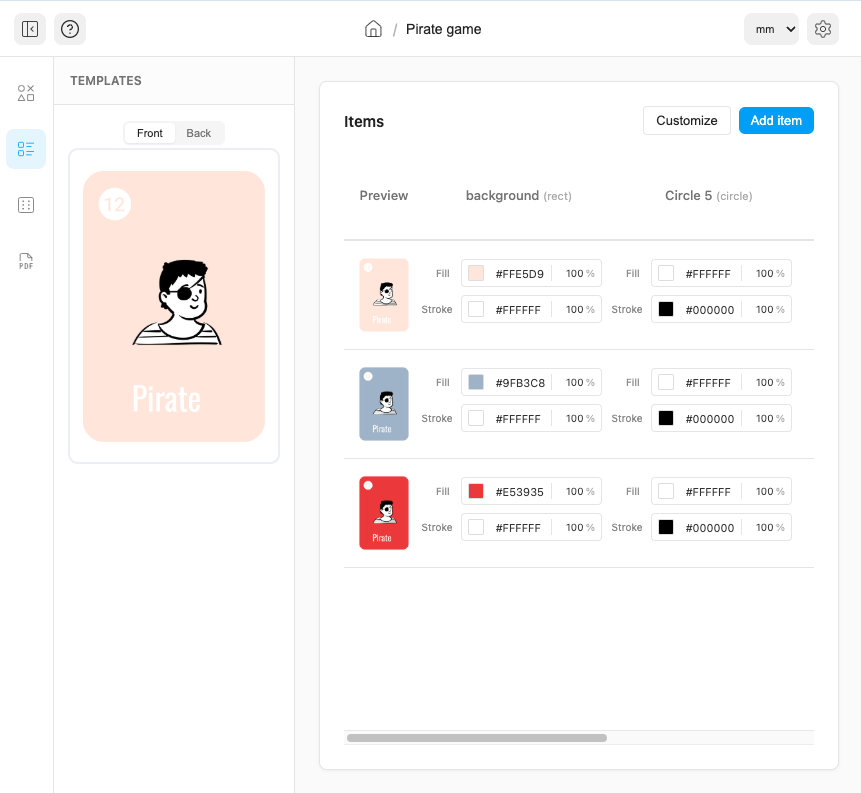
After collecting your ideas, you can start creating the cards for your game. We use our own app, SalutCard, to create, test, and prepare games for printing. It allows you to create card templates, manage card data, and automatically export your cards as A3 or A4 PDF files that are easy to print at home or at a local print shop.
Instead of SalutCard, you can use any graphics editor. However, remember that you’ll probably change your cards and game elements many times. Making the same changes manually across dozens of cards quickly becomes time-consuming and error-prone.
Online playtesting
Before printing anything, it’s a good idea to test your game on a screen. Printing and cutting prototypes—even at home—takes time and is usually one of the least enjoyable parts of the game creation process.
There are several tools that let you playtest games online, but most of them require you to export your game assets from one application (for example, a graphics editor) and import them into another tool, followed by additional setup to define how those components behave.
We wanted to eliminate that extra work, so we added an online game creator directly to SalutCard. This gives you card design tools, spreadsheets, online playtesting, and print-ready exports in a single application.
Physical prototype
Once you’ve tested your game online, it’s time to print and cut the cards. Use tools designed for cutting printed A3 or A4 sheets into individual cards, such as a paper cutter like the Vaessen Creative 2207-108. You can also round the corners using a corner punch from AliExpress or a local craft store.
In our experience, it takes around 60–100 minutes to cut 100 cards by hand. At this stage, don’t spend time searching for manufacturers to create a professional-quality prototype. Make one yourself, test the game, collect feedback, and only start contacting manufacturers once the gameplay feels polished. Working with third-party manufacturers adds communication, production, and shipping time, so it’s best to wait until your design is relatively stable.
Playtesting and collecting feedback
At this stage, try to collect as much feedback as possible, especially if you plan to sell the game. Be prepared to hear criticism, and don’t forget to write everything down. If you don’t document feedback immediately, you’ll probably forget important details later.
You can playtest the game online with people from anywhere in the world (see Online playtesting), invite your family and friends to play, or send physical prototypes to testers in other locations. The best feedback usually comes from sessions where you’re present to observe how people play, ask follow-up questions, and notice where they struggle.
Once you’ve collected enough feedback, repeat the previous steps and continue improving your game.
How SalutCard can help with game creation
SalutCard is a tool for creating game cards using templates and a data-driven deck editor. It makes it easy to update card designs, modify card data, and export print-ready files.
Most importantly, you can playtest your game online before printing physical prototypes.
If you have any questions, feel free to contact us at [email protected].